
Over the last few months I’ve been writing about AI, and specifically, how LLMs work under the hood. The response has been great, and a few of you have written in with follow up questions. One theme that keeps coming up is the topic of Context Windows: what they are, how they work, etc.
You see the numbers quoted everywhere. 100k token context window, 1 million tokens, 10 million tokens. The numbers keep going up, the marketing keeps getting louder, and most people have no clear sense of what any of it actually means.
So today, we fix that.
By the end of this Letter you’ll know what a context window is, why a bigger number doesn’t always mean a better model, and how to think about all of it next time you’re choosing which AI to use. I’ll also share some tips and tricks for optimizing your context window regardless of what model you’re using.
The simple version
A context window is the model’s working memory.
Everything the model needs to do its job in a single request has to fit inside it. That includes your prompt, the system instructions, any documents or images you’ve uploaded, the conversation history from earlier in the chat, the tools the model has access to, and the response it’s about to generate.
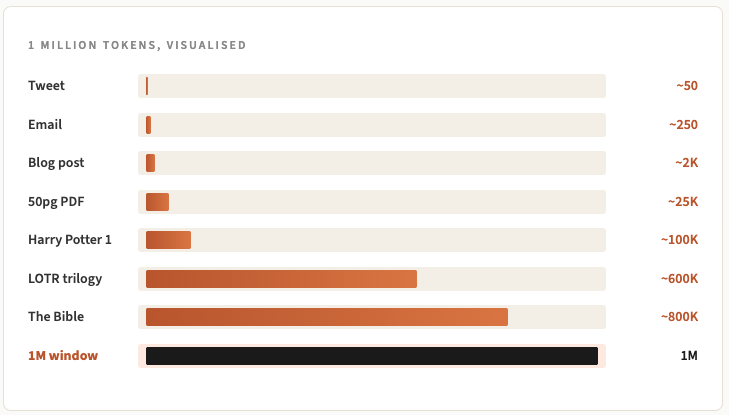
All of it shares one budget, and the budget is measured in tokens. I covered tokens in Letter 108, but as a refresher, a token is roughly 3/4 of a word. So a 200,000 token context window holds around 150,000 words of stuff at once. A million tokens is around 750,000 words, which, for reference, is the length of a fairly long novel.
How we got from 4,000 tokens to 10 million
Let’s appreciate just how fast things have accelerated over the last few years.
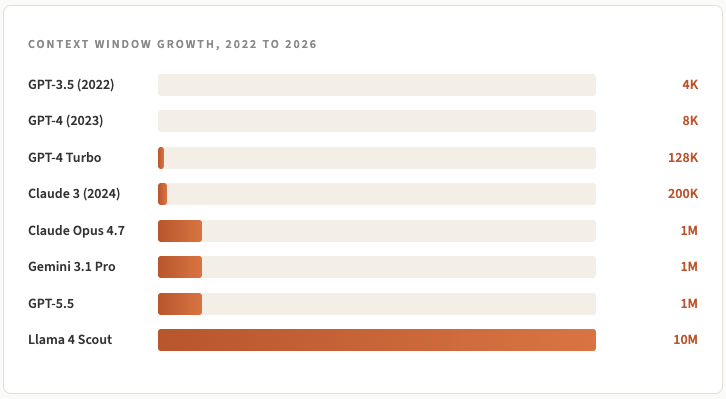
When ChatGPT launched in late 2022 it was with the GPT-3.5 model and that had a 4,000 token window. You couldn’t paste a long article in without hitting the wall.
By early 2023 we had 8k and 16k models and by late 2023, OpenAI shipped GPT-4 Turbo with 128k. Soon after, Anthropic pushed Claude to 200k and then Google blew the doors off with Gemini 1.5 Pro and 1 million tokens in early 2024.
In March this year, Anthropic made Claude Opus 4.6 generally available at 1 million tokens with no pricing surcharge and one month later they shipped Opus 4.7, which kept the 1M context, and that’s basically become the standard across the board.
Meta’s Llama 4 Scout claims 10 million which seems a bit excessive to me since the quality of output as the context window expands degrades significantly (more on this soon).
Overall though coming from when ChatGPT launched to today, it’s a 250x to 2500x increase.
Larger context windows are more expensive to build. Transformer models (the architecture LLMs are built on) use something called self-attention, where every token pays attention to every other token in the sequence. Doubling the context window roughly quadruples the computation, so a 1 million token model isn’t five times more computation than a 200k model, it’s actually 25 times more.
Most of the recent gains have come from clever engineering around how attention works, prompt caching, and efficient memory management.
Is bigger always better?
I’m no expert on this topic as a general rule (though word on the street says no), but when it comes to AI context windows, bigger is not always better.
The context window size is the maximum the model can technically accept, but it’s not necessarily the amount it can use well / optimally.
Some researchers at Chroma published a study last year called Context Rot. They tested 18 different state of the art models, including Claude, GPT and Gemini, on simple retrieval tasks at different input lengths. The task itself stayed the same, only the length of the input changed.
Every single model got worse as the input got longer. Some models that were scoring near 100% on short inputs were under 50% on the same task with a longer input.
The community adopted the name of the study and the phrase “context rot” quickly became part of the AI vernacular. The gist is simple: as you stuff more into a prompt, the model becomes less reliable (even when none of the extra content should matter and genuinely add helpful context).
A few things are going on under the hood to cause this context rot:
Models tend to pay more attention to the start and end of a prompt than the middle. Important information buried in the middle of a long context can get ignored. The researchers call this lost in the middle (scientists aren’t known for their originality in naming conventions, see: the Very Large Telescope in Chile).
When there’s content in the prompt that looks similar to what you’re asking about but isn’t quite right, the model gets confused. Even one of these distractors can throw it off.
Where information sits in the prompt also affects how well the model uses it. The same fact at position 1,000 performs differently to the same fact at position 50,000.
When the question and the answer use different words for the same idea, the model struggles more as the context grows.
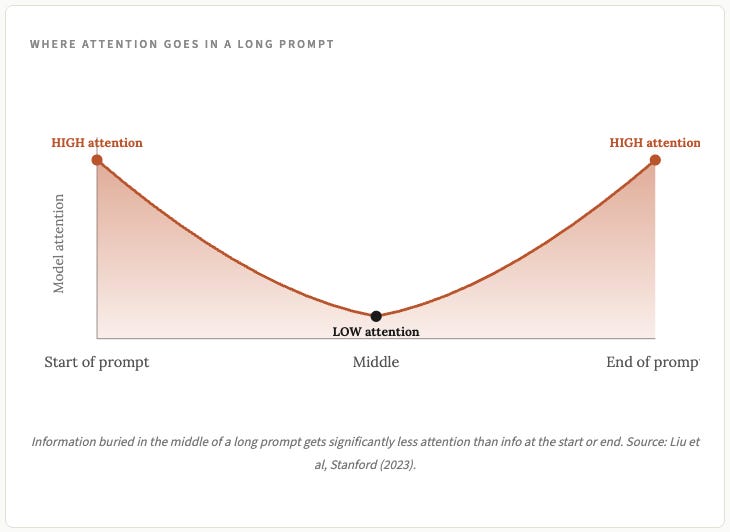
The takeaway is that the advertised context window figure is a ceiling, not a target, and you should generally be clearing your context window and starting fresh well before you get close to the ceiling for practically every task you use AI for.
Another reason bigger isn’t always better is the cost / usage. The larger a context window you’re utilizing, the more tokens you’re sending back and forth and you’re either paying for that via the API or you’re using your monthly subscription usage limits up. Keeping your context windows small and manageable is not only better from the perspective of ensuring better quality outputs, but it’s fiscally prudent too.
What this means for what you’re actually doing
If you’re using AI for work that involves a lot of information at once, the context window matters; most people are not actually doing this though.
Most documents are smaller than people assume. For example, a 50 page PDF is around 25,000 tokens. You can paste a document like that in and have a long back and forth conversation with the AI and be well under 100k tokens.
If you’re building and using your own agents however, this becomes really important. Agentic workflows burn through tokens fast. Like, really, really fast. The agent reads a page, decides what to do, calls a tool, reads the result, repeats. Every step adds to the context. When you chat with your agent, it’s not only reading your entire chat history every time for context, it’s also loading other skills and tools and bits of memory in order to work as well as it does.
I can hit a 200k context window within an hour or two of chatting back and forth.
Coding just adds to this. If you’re coding you can burn through tokens insanely fast once subagents and parallel work gets involved.
This is one of the reasons local models can be a very appealing option for certain work. There are no per-token charges or usage limits when you have a local model. I covered local models in Letter 107 if you want to learn more there.
How to actually manage your context window
This is the part of the Letter I want you to take away most. Below are the practical tactics I use, alongside guidance from some of the experts who actually build these models.
The bigger lens here is something Anthropic’s engineering team calls context engineering. They published a deep dive on it in September 2025 and it’s worth a read if you want to go further than this Letter takes you. Their summary line is the best I’ve seen on the topic:
“good context engineering means finding the smallest possible set of high signal tokens that maximise the likelihood of the outcome you want”
That framing has actually changed how I use AI day to day. Instead of asking what should I put in, I now ask what can I leave out (once again, “less is more” wins the day).
Here are the tactics that flow from that.
1. One task per chat, and start fresh often
This is the single most useful habit I’ve picked up. If you’re researching one topic and then pivot to something else, start a new chat. If you finish drafting something and want to refine it, start a new chat. If you spend an hour debugging one issue and the next issue is unrelated, start a new chat.
Teresa Torres, who writes about AI product work at Product Talk, put it really well: every long chat is accumulating noise, and that noise is actively making the next response worse.
2. Use the handoff technique
When you do need to carry context forward, get the model to write a dense summary of what matters before you start over. Copy it and paste it into the new chat as the opening message.
This is essentially what Claude Code does automatically when it hits the context limit. Anthropic calls it compaction, and they describe it in their context engineering post as the first lever you should pull. They preserve architectural decisions, unresolved bugs and key files while throwing away redundant tool outputs and old messages. You can do the same thing manually with any AI tool.
3. Watch the 50% line
Arthur Clune, who works on AI products, made a really sharp observation in a recent post. LLM accuracy starts declining noticeably once the context window passes about 50% full. Anthropic’s own compression triggers automatically at 95%, which means by the time you see the message, you’ve been operating in degraded mode for a while.
That’s why you should not just wait for Claude Code to automatically compact, since that only happens when you get close to the limit. You can manually run it yourself by typing /compact whenever you want.
4. Curate before you work with AI
Pulling in 5 relevant documents is going to get you a better result than stuffing the context with 50 documents and hoping the AI can “just figure it out”. The model doesn’t always know what’s important (and it certainly doesn’t know what’s important to you specifically). You know, so use whatever edge you have as a human while you can.
5. Put the important stuff at the start or end
The lost-in-the-middle research has held up across model generations. Information at the start and end of a prompt gets more attention than information buried in the middle. If you have a long document and one paragraph really matters, restate that paragraph at the end of your prompt, even if it’s already in the document a couple of times.
6. Use Projects or Custom GPTs for persistent context
Claude has Projects. ChatGPT has Custom GPTs. Both let you set up a persistent system prompt and upload reference files that don’t count against each individual chat’s context. If you have a recurring use case, put the instructions and reference material in a Project or Custom GPT instead of repeating them in every chat.
7. Use RAG for big knowledge bases
RAG stands for Retrieval Augmented Generation. Instead of dumping a thousand documents into the prompt, you index them in a vector database, and only pull the most relevant chunks for each question. This is what tools like Perplexity, NotebookLM and ChatGPT’s deep research feature are doing under the hood. I’ll cover RAG properly in a future Letter, it deserves a dedicated piece.
8. Pick the right model for the job
Gemini 3.1 Pro is cheap for huge document processing. Claude Opus 4.7 is the strongest at reasoning over the context once it’s in there, with Sonnet 4.6 a great middle option if cost matters. GPT-5.5 is OpenAI’s current frontier and sits between them on price. If you’re processing a 500 page PDF, Gemini is probably your tool. If you’re working through a complex multi-step problem, Opus or GPT is probably your tool.
9. For agents, separate read tasks from think tasks
If you’re building agents (or using Claude Code, Cowork, Cursor and the like), Anthropic’s research on long-running agents is gold. The key insight is that exploration burns context fast. So they recommend subagents, which are spawned for specific read heavy tasks (search across files, review code for security issues) and return only a summary. The main agent’s context stays clean.
You can apply this manually too. If you want Claude to research something deeply and then act on the findings, do the research in one chat, get a tight summary, and use that summary as the starting point in a new chat for the action work.
10. Don’t paste images you don’t need
Images are expensive in token terms. A single high-res screenshot can use 1,000 to 2,000 tokens. If you've uploaded 20 screenshots into a long chat, that’s 20,000 to 40,000 tokens just on the images alone. I’m a huge fan of screenshotting and adding things to chat, but it can get a bit out of hand at times, and this is a good reminder to not go overboard with them.
Closing thoughts
Hopefully this has helped you understand a bit more about what context windows are and how they work. Most people just see headlines that brag about bigger context windows and think that bigger is always just straight up better, but the reality is that I am rarely going over 200k tokens for any of my tasks these days. Occasionally I’ll get to 400-500k before compacting, but not that often.
Maybe / hopefully one day this problem gets solved and we can reliably use 1 million or even 10 million token context windows without things getting lost in the rot of it all.
Until then though, keep an eye on your context. Regularly start new chats when you have new tasks, handoff from one session to another, and repeat the important things at the start and end of your prompts if you want better outputs.
Thanks as always for reading, and see you next week!
Disclaimer: The content covered in this newsletter is not to be considered as investment advice. I’m not a financial adviser. These are only my own opinions and ideas. You should always consult with a professional/licensed financial adviser before trading or investing in any cryptocurrency related product. Some of the links shared may be referral links.
"One task per chat, and start fresh often" -- super useful to know this. I've noticed the longer my AI chats become (I have some pinned with 100+ inputs) seem to get worse, but I thought 'this can't be true, it should get smarter with more info'. Now I understand the real truth. I'm going to start fresh from now on. Thank you.
Thanks for sharing Zeneca 🙌